Podcasts!
I am geeking out a bit over this topic but what can I say?! Podcasts are great for just about anyone. They're pretty much like talkshows about any topic you can think of. My brothers follow some on sports and politics and some friends follow others on gaming. Listeners can usually send comments to the podcasters and have them discuss those topic for their next podcast.
I really see this being used more for the upper grades (middle school and high school) but I did use it twice for the elementary level kiddos.
One instance was to record myself reading books. Students would then choose the audio file of the book they had chosen and they would follow along with their book as I (in the audio file) was reading the book.
Another instance was when I created accounts for the students who were struggling readers. I recorded them trying to read 3 books and sent those books home for them to read with parents. The parents were able to log on and listen and follow along to see which words their kids were struggling with. They would also listen to my voice to know what techniques I was telling the child to use and how to praise them so that they may do the same with their child.
As for podcast hosting sites are concerned they are tons to choose from but they are not all the same. The one I used for the above projects deleted them after a certain amount of time. Definitely a huge bummer since it took a lot of work and I most certainly learned my lesson about better researching the podcast host sites I use in the future.
Some very good options are soundcloud, podbean, podomatic.
SoundCloud
This site is mostly used for musical artists to upload their music and get heard. SoundCloud is fairly easy to use and even allows for graphics to be added as background images. It offers a free trial and after that would require a payment of $7-$15 a month depending on the plan you choose. A major plus for SoundCloud is that it has an app as well so it makes for listening and recording on any device an even easier task.
PodBean
This site was by far my favorite to use. I liked the interface which was user friendly and it also has an app as well. There are also options to get paid memberships that would grant more bandwidth, storage and podcast channels. I liked it so much that it was the one I used for my own podcast. I found it a lot better to use using my phone since I was able to record directly on it instead of having to use separate software to record and then upload.
Podomatic
This site is a great site if you are an avid Facebook user. Its interface is similar to the social media site and also has a section of trending topics and podcasts as well. Podomatic has an app as well but from what I was able to see it did not allow the feature of recording a podcast from the app. Not too sure if this is something that can't be done on iOS but can on Android.
Below is my podcast which is a read aloud of a short story from a storybook collection.
Happy podcasting!!!
Sunday, November 13, 2016

Sunday, November 6, 2016
Cartoons and Comics
Good evening!
Tonight's blog post is about using online cartoon and comic creators in the classroom.
There many sites such as ToonDoo, Pixton, and MakeBeliefsComix that students and educators can use to create lesson and projects that can not only be original but fun as well.
I tried creating a comic in each site. Some yielded better results than others when I created my own.
ToonDoo
The site itself gave me the hardest time with loading. After several attempts I was able to create a toon but editing never quite came out right when I tried resizing things. Of the three it was the site I had the most difficulty in using due to technical issues which is why I couldn't screenshot or embed but hopefully the link works. I will test it on a Windows computer to see if it works.
http://www.toondoo.com/View.toon?param=10589478
Otherwise it seemed okay
Paxton
The site was fairly easy to use. It does require registration and offers a limited day trial. It was fairly easy to use but the format seemed more fitting for older students and educators.
<iframe src="//www.pixton.com/schools/embed/yqljdw6w" frameborder="0" width="100%" height="384" allowfullscreen></iframe>
Make Beliefs Comix
This site was by far my favorite of the three. It required no registration which is great for students. No memorizing user logins. The comic can be saved onto the computer, emailed or printed. Some of the things that can be added to the comic are animated which makes it even funnier to look at.

Tonight's blog post is about using online cartoon and comic creators in the classroom.
There many sites such as ToonDoo, Pixton, and MakeBeliefsComix that students and educators can use to create lesson and projects that can not only be original but fun as well.
I tried creating a comic in each site. Some yielded better results than others when I created my own.
ToonDoo
The site itself gave me the hardest time with loading. After several attempts I was able to create a toon but editing never quite came out right when I tried resizing things. Of the three it was the site I had the most difficulty in using due to technical issues which is why I couldn't screenshot or embed but hopefully the link works. I will test it on a Windows computer to see if it works.
http://www.toondoo.com/View.toon?param=10589478
Otherwise it seemed okay
Paxton
The site was fairly easy to use. It does require registration and offers a limited day trial. It was fairly easy to use but the format seemed more fitting for older students and educators.
<iframe src="//www.pixton.com/schools/embed/yqljdw6w" frameborder="0" width="100%" height="384" allowfullscreen></iframe>
Make Beliefs Comix
This site was by far my favorite of the three. It required no registration which is great for students. No memorizing user logins. The comic can be saved onto the computer, emailed or printed. Some of the things that can be added to the comic are animated which makes it even funnier to look at.

Sunday, October 30, 2016
Videos and QR codes in the library
Good evening everyone!
Next up on the school library blogosphere are videos QR codes. What about them? Well they can become very useful tools for students and librarians if used efficiently.
As mentioned in the past blog post, a way to create helpful videos is by screen casting. Many school libraries and districts create videos to distribute information to users and for them to be able to reference to those videos as often as needed.
Examples: Norman High School in Oklahoma
Their YouTube channel features videos that teach students how to use a certain resource.
One I found was a great idea to create was the video on how to navigate their school library page. Videos such as these are very helpful for students to continuously refer to and saves the librarian time in having to go over it again and again.
Another useful video they created is one based on how to used EBSCOHost. It is another great example of creating videos for student reference.
The Unquiet Library is a high school library located in Georgia. Their channel creates videos mostly for mini-lessons. Below are some great examples:
Pikesville High School also has a YouTube channel that features student work as well as school activities. Some videos that caught my eye were the teacher introduction videos. I feel like these would be great for students' whose parents could not attend report card night and would like to know about the teacher and the class they teach.
Videos can also be used for schools to create PSAs. They can also be silly and funny PSAs. Anything that gets the message across!
Now how do we give access to students, faculty and parents for these type of videos? There are many ways but one of the easiest would be sharing through the use of QR code. They can be used to share links, share events, and share information. In keeping with the topic of creating videos I created a book trailer using the website Animoto. It has many ready made templates to use to create slideshow type of videos with animation and songs included.
Sites such as QR stuff and Visual Lead can be used to create QR codes to share any type of information while apps on iOS or Android can be used from any sort of tablet or phone equipped with the mentioned or similar apps to read the created QR codes.
Below is the QR code for the book trailer I created for the book Stargirl by Jerry Spinelli.

Make sure to share your own QR codes, videos or book trailers below. How did the students like them being used as part of your teaching?
Another useful video they created is one based on how to used EBSCOHost. It is another great example of creating videos for student reference.
The Unquiet Library is a high school library located in Georgia. Their channel creates videos mostly for mini-lessons. Below are some great examples:
Pikesville High School also has a YouTube channel that features student work as well as school activities. Some videos that caught my eye were the teacher introduction videos. I feel like these would be great for students' whose parents could not attend report card night and would like to know about the teacher and the class they teach.
Videos can also be used for schools to create PSAs. They can also be silly and funny PSAs. Anything that gets the message across!
Now how do we give access to students, faculty and parents for these type of videos? There are many ways but one of the easiest would be sharing through the use of QR code. They can be used to share links, share events, and share information. In keeping with the topic of creating videos I created a book trailer using the website Animoto. It has many ready made templates to use to create slideshow type of videos with animation and songs included.
Sites such as QR stuff and Visual Lead can be used to create QR codes to share any type of information while apps on iOS or Android can be used from any sort of tablet or phone equipped with the mentioned or similar apps to read the created QR codes.
Below is the QR code for the book trailer I created for the book Stargirl by Jerry Spinelli.
Make sure to share your own QR codes, videos or book trailers below. How did the students like them being used as part of your teaching?
Sunday, October 23, 2016
Social Media in the Classroom
Most of us as adults use social media to keep in contact with friends and to see what others are up to such as celebrities and to know what is going on in other across the world.
Nowadays schools are fully immersing into using as much technology as possible in the classrooms.
As an educator have you ever considered combining the two, social media and tech in the classroom?
Apps such as Twitter, Facebook, Instagram, Vine and programs such as Screencast-o-matic are starting to become common staples in tech-filled classrooms, and with good results. Incorporating technology in the schools also provides parents resources to stay connected with their child's school and be updated with school events rather than wondering where that handout with the school calendar went.
Below I offer a personal review of some of the apps that could be used in the classroom.
Screencast-O-Matic
I've seen this program being used most often in my graduate courses, especially since they're online courses. Professors often use Screencast-O-Matic to show their students how to navigate through Blackboard or other programs needed for certain courses. At the EC-12 levels it can also be used for students and parents as well. I included a screencast of my own for students at the elementary level. I can see this being used for middle school and high school to teach them how to use programs like Prezi. Screencasts are great because students can always refer to them outside of the classroom.
Personally I liked Screencast-O-Matic much more than others such as Jing. Jing took too many tutorials to figure out and even then I still couldn't figure it out well enough to create a screencast.
Screencast for Adobe Spark
Adobe Spark
This app was one of my favorites to use. It felt like using Instagram but with a whole bunch of extra features. You can use pictures and add text and effects to them, you can create blog/scrapbook type pages and you can also create videos. I felt it was very user friendly although I did find it a bit easier to use on my phone as compared to using it on my Macbook. The phone app is very limited since I was only able to edit and create photos and not pages or videos.
This picture can easily be saved and posted onto Instagram or on Twitter with a tiny url.
Spooky Reads/Adobe Spark
Instagram
I use Instagram for my personal photos but I have started to see several high schools use it to display school events and student work. School libraries often display pictures of new books that they have received and new makerspaces that are available for use. I am not allowed to post pictures of students on personal accounts and my school currently does not have a Instagram account. For these reasons I will refer to some of my favorite school library Instagram accounts:
Castilleja School Library
The Daring Librarian
Vine
I've personally never used to Vine but have seen Vines before. It's owned by Twitter and is used to create short videos. I mean SHORT, six seconds type of short. What can one do in six seconds? The huge time constraint really kickstarts the imagination and ensures that it's straight and to the point. Again, I am not allowed to record at school (only technology trainer, parent liaison, and yearbook staff) and there is no vine account active for the school at this moment I will refer to a great example of using Vine in a school library:
The Daring Librarian
It is great that social media is doing a crossover into school in a functional and educational way. I see this being used more for middle school and especially high school or in elementary schools where students' parents have access to technology (such as smart phones).
Which apps have you used in the classroom and how well did they work with your students?
Comment below!
Nowadays schools are fully immersing into using as much technology as possible in the classrooms.
As an educator have you ever considered combining the two, social media and tech in the classroom?
Apps such as Twitter, Facebook, Instagram, Vine and programs such as Screencast-o-matic are starting to become common staples in tech-filled classrooms, and with good results. Incorporating technology in the schools also provides parents resources to stay connected with their child's school and be updated with school events rather than wondering where that handout with the school calendar went.
Below I offer a personal review of some of the apps that could be used in the classroom.
Screencast-O-Matic
I've seen this program being used most often in my graduate courses, especially since they're online courses. Professors often use Screencast-O-Matic to show their students how to navigate through Blackboard or other programs needed for certain courses. At the EC-12 levels it can also be used for students and parents as well. I included a screencast of my own for students at the elementary level. I can see this being used for middle school and high school to teach them how to use programs like Prezi. Screencasts are great because students can always refer to them outside of the classroom.
Personally I liked Screencast-O-Matic much more than others such as Jing. Jing took too many tutorials to figure out and even then I still couldn't figure it out well enough to create a screencast.
Screencast for Adobe Spark
Adobe Spark
This app was one of my favorites to use. It felt like using Instagram but with a whole bunch of extra features. You can use pictures and add text and effects to them, you can create blog/scrapbook type pages and you can also create videos. I felt it was very user friendly although I did find it a bit easier to use on my phone as compared to using it on my Macbook. The phone app is very limited since I was only able to edit and create photos and not pages or videos.
This picture can easily be saved and posted onto Instagram or on Twitter with a tiny url.
Spooky Reads/Adobe Spark
I use Instagram for my personal photos but I have started to see several high schools use it to display school events and student work. School libraries often display pictures of new books that they have received and new makerspaces that are available for use. I am not allowed to post pictures of students on personal accounts and my school currently does not have a Instagram account. For these reasons I will refer to some of my favorite school library Instagram accounts:
Castilleja School Library
The Daring Librarian
Vine
I've personally never used to Vine but have seen Vines before. It's owned by Twitter and is used to create short videos. I mean SHORT, six seconds type of short. What can one do in six seconds? The huge time constraint really kickstarts the imagination and ensures that it's straight and to the point. Again, I am not allowed to record at school (only technology trainer, parent liaison, and yearbook staff) and there is no vine account active for the school at this moment I will refer to a great example of using Vine in a school library:
The Daring Librarian
It is great that social media is doing a crossover into school in a functional and educational way. I see this being used more for middle school and especially high school or in elementary schools where students' parents have access to technology (such as smart phones).
Which apps have you used in the classroom and how well did they work with your students?
Comment below!
Sunday, October 16, 2016
Infographics
So...let's talk about infographics. I began seeing them quite a bit in my field of education. I saw them as what I like to refer to as "adult anchor charts". They provide a lot of information in an eye catching way. I always wondered how exactly they were created. Was there a special program needed for that? Was it a website? Well I didn't have to wonder any longer when it became an assignment. The task? Sample three websites. Choose the best one. Create an infographic. Simple, right? Not quite but practice could very well make this perfect.
The three websites I checked out were:
I started by getting a free account for each. Afterwards I started browsing around and watching some tutorials to make sure I wasn't overlooking any features of either website. After that and having the research I wanted to use on hand, it was time to create.
Easel.ly

If you have used Prezi before then I feel like Easel.ly should be fairly easy to use. I personally find Prezi a tiny bit tedious for me so after tinkering with it for a bit I gave it a pass.
Piktochart

Personally I felt like Piktochart had the easiest ready-made templates to use. It took a bit of time to get the hang of it but after a while it felt like using a more modern version of Microsoft Publisher. I felt comfortable using it and ended up using this one for my final product.
Infogr.am

I was left completely confused with this one. I kept going back to see if maybe I was choosing the wrong option but I wasn't. Based on the templates it was offering me it felt more like a way to create chart and that's it. Not much room for anything else other than that. I quit after a few attempts.
Final product!
Infographic Using Piktochart
I used research based on the services public libraries offer and how well they are used by the general public. Citations are on the infographic.
Let me know which site you used to create your own infographic. If you have any tips to better use the other sites I mentioned please comment below.
-Monica V.
The three websites I checked out were:
I started by getting a free account for each. Afterwards I started browsing around and watching some tutorials to make sure I wasn't overlooking any features of either website. After that and having the research I wanted to use on hand, it was time to create.
Easel.ly

If you have used Prezi before then I feel like Easel.ly should be fairly easy to use. I personally find Prezi a tiny bit tedious for me so after tinkering with it for a bit I gave it a pass.
Piktochart

Personally I felt like Piktochart had the easiest ready-made templates to use. It took a bit of time to get the hang of it but after a while it felt like using a more modern version of Microsoft Publisher. I felt comfortable using it and ended up using this one for my final product.
Infogr.am
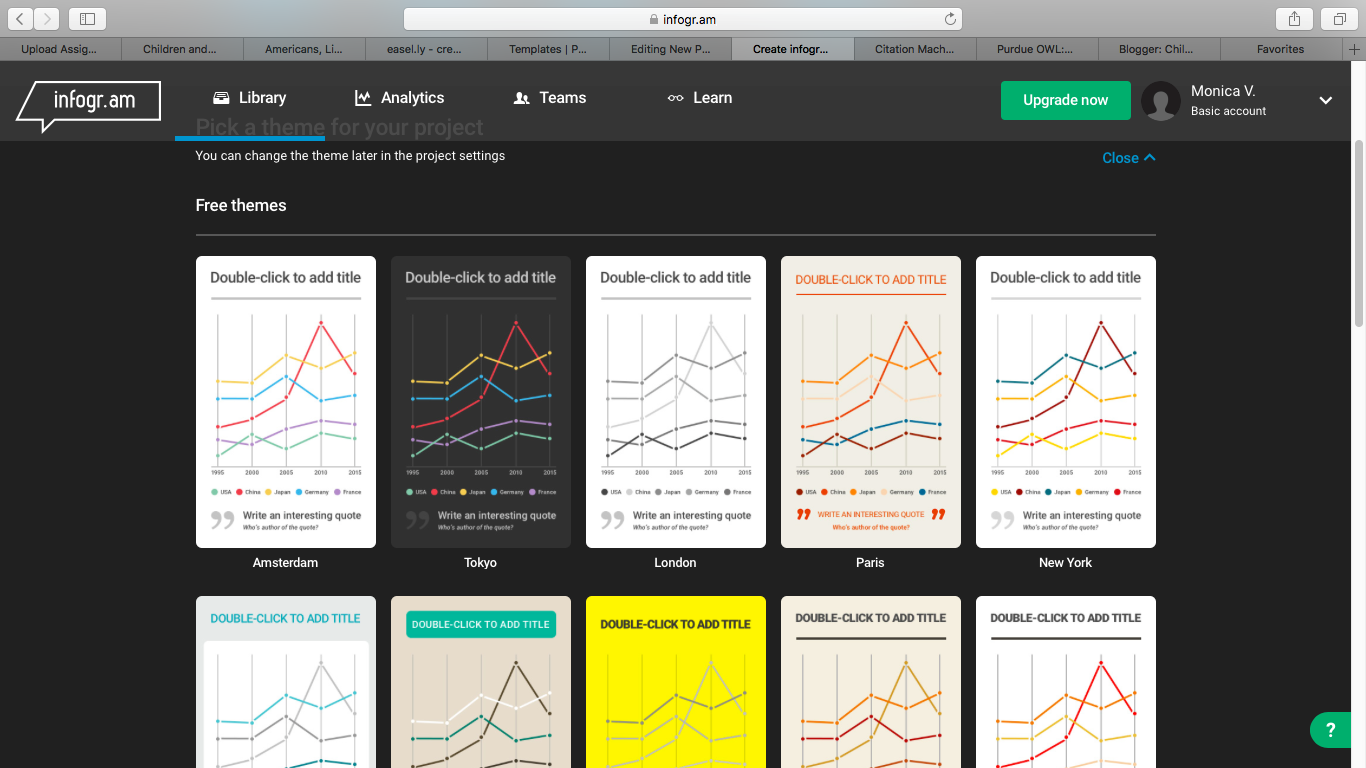
I was left completely confused with this one. I kept going back to see if maybe I was choosing the wrong option but I wasn't. Based on the templates it was offering me it felt more like a way to create chart and that's it. Not much room for anything else other than that. I quit after a few attempts.
Final product!
Infographic Using Piktochart
I used research based on the services public libraries offer and how well they are used by the general public. Citations are on the infographic.
Let me know which site you used to create your own infographic. If you have any tips to better use the other sites I mentioned please comment below.
-Monica V.
Thursday, October 6, 2016
Blog Readers
Being a complete novice in the world of blogging, today's assignment was a big "huh?".
Blog readers. I had never heard of them before and after reading The 10 Best Feed Reader Apps for RSS, News and More The article offered many different types but I went with one that was free, user-friendly and that would function well on iOS.
My choice was Feedly
It was fairly simple to link blogs I follow. Tumblr pages can also be linked using Feedly.
The interface of the site was pretty straightforward on both my Macbook and on my iPhone.
Macbook:

iPhone:

Blog readers. I had never heard of them before and after reading The 10 Best Feed Reader Apps for RSS, News and More The article offered many different types but I went with one that was free, user-friendly and that would function well on iOS.
My choice was Feedly
It was fairly simple to link blogs I follow. Tumblr pages can also be linked using Feedly.
The interface of the site was pretty straightforward on both my Macbook and on my iPhone.
Macbook:

iPhone:

Some of the blogs I chose to follow are people I already currently follow on Twitter. Although it may seem redundant I wanted to compare what ways would be better be updated on these people I follow.
1. Mr.SchuReads
John Schu has many ties to the school library world. He is currently an Ambassador for school libraries for Scholastic. He posts quite often. His posts are often about new books coming out soon or ways to integrate new literature in fun ways to children.
Gwyneth Jones is a school librarian and also a keynote speaker and blogger. She updates often and incorporates a lot of technology in her activities, bringing true meaning to the words "library media center". Her blog is usually where I refer to when in need ideas for library science assignments or for using technology (in the class since I'm not yet in the library).
Tiffany Whitehead is a school librarian, international blogger and blogger as well. She offers a lot of suggestions for librarians to use for themselves so they can become more proficient, updated and organized in their area. She also refers to online resources for school librarians (or students like me) can use to stay current on school library trends.
The next two blogs are ones I just started to follow recently and not on Twitter like the previous ones stated.
The site refers itself as an "open access, open peer-reviewed journal". It is run by past and current librarians internationally and from different types of libraries. I started reading up on them a few days ago and I have seen some really well-written articles that are tailored to issues that school libraries are facing.
5. Biblioboard
This Tumblr account combines a mix of a everything. I'm fairly new with the website but from a few of the articles I did see were reviews from other school district's libraries as well as lectures by other authors .
Can't wait to use Feedly a bit more and see if I make a permanent switch from some of my other social networking apps.
Friday, September 9, 2016
The Use of Facebook and Twitter in School Libraries
I typed in "school libraries" on the search bar on Facebook and I was surprised at the small amount of results it yielded. There was several results from other countries but very few from the United States. That is not to say they are not useful to look at though. After some scrolling I saw a few schools that caught my eye and I decided to look into them a bit further.
The first was an elementary school in North Carolina named Tryon Elementary.
Tyron Elementary
It seemed like a page that was meant more for parents and teacher that work at thats school. Based on their posts it looked like it was updated often and I really liked that it kept parents updated on upcoming events using the Facebook events feature.
I decided to check out pages for high schools. From the three that I saw I noticed they catered more to the students they serviced rather than their parents or even the faculty at school.
Carmel High School's Library in Indiana focused on demonstrating how the students used the library. I was pleased to see they often held contests for students to win reading materials. Contests like that definitely bring in more students to the library.
Carmel High School
I was very happy to see my old high school have their own Facebook page and to see that it is updated quite a bit. It mostly showcases activities that their book club members take part in. I also really liked that they showed their monthly book displays. I'm very glad to see this since I definitely know this was not around when I was a high school student.
Martin High School
Overall the pages I saw had great content but it seems it may be overlooked. Most of the posts had not comments and just a few likes. The advantages of using Facebook is that you can publish lengthier posts, more pictures and also use features such as Events to promote things going on at school. The disadvantage of Facebook is that it doesn't seem to reach that big of an audience or at least that is what I saw from the lack of likes and comments on all the posts from the mentioned pages. All of them could benefit from more promotion of their page since most had great contents that their intended audience is missing out on.
As for Twitter I personally feel it would be great to showcase what is being done in the library and share quick tidbits of upcoming events and activities going on. The drawback is that in the area I work at I know Twitter is not a commonly used social network. In this case a parent meeting/training might be beneficial.
Looking at Kathy Schlock's Twitter page I felt a bit out of touch with all the new technology that is out there that can actually be integrated into classroom lessons. The posts featured some of the latest gadgets which included some I hadn't heard of before such as this
https://twitter.com/kathyschrock/status/775059602857754624
By far one of my favorite people to follow is The Daring Librarian. She always comes up with these innovative ways to incorporate idea and technology in the school library while still making it enjoyable and fun for librarians, teachers and especially students. I have followed her for some time now and always refer to her when I am completing assignments and am completely stumped.
There are many ideas, people and technologies that can inspire us to do more for our schools, libraries and our students. I cannot wait to share these ideas with my school librarian. I will also keep them in mind for when I become a librarian too.
The first was an elementary school in North Carolina named Tryon Elementary.
Tyron Elementary
It seemed like a page that was meant more for parents and teacher that work at thats school. Based on their posts it looked like it was updated often and I really liked that it kept parents updated on upcoming events using the Facebook events feature.
I decided to check out pages for high schools. From the three that I saw I noticed they catered more to the students they serviced rather than their parents or even the faculty at school.
Carmel High School's Library in Indiana focused on demonstrating how the students used the library. I was pleased to see they often held contests for students to win reading materials. Contests like that definitely bring in more students to the library.
Carmel High School
I was very happy to see my old high school have their own Facebook page and to see that it is updated quite a bit. It mostly showcases activities that their book club members take part in. I also really liked that they showed their monthly book displays. I'm very glad to see this since I definitely know this was not around when I was a high school student.
Martin High School
Overall the pages I saw had great content but it seems it may be overlooked. Most of the posts had not comments and just a few likes. The advantages of using Facebook is that you can publish lengthier posts, more pictures and also use features such as Events to promote things going on at school. The disadvantage of Facebook is that it doesn't seem to reach that big of an audience or at least that is what I saw from the lack of likes and comments on all the posts from the mentioned pages. All of them could benefit from more promotion of their page since most had great contents that their intended audience is missing out on.
As for Twitter I personally feel it would be great to showcase what is being done in the library and share quick tidbits of upcoming events and activities going on. The drawback is that in the area I work at I know Twitter is not a commonly used social network. In this case a parent meeting/training might be beneficial.
Looking at Kathy Schlock's Twitter page I felt a bit out of touch with all the new technology that is out there that can actually be integrated into classroom lessons. The posts featured some of the latest gadgets which included some I hadn't heard of before such as this
https://twitter.com/kathyschrock/status/775059602857754624
By far one of my favorite people to follow is The Daring Librarian. She always comes up with these innovative ways to incorporate idea and technology in the school library while still making it enjoyable and fun for librarians, teachers and especially students. I have followed her for some time now and always refer to her when I am completing assignments and am completely stumped.
There are many ideas, people and technologies that can inspire us to do more for our schools, libraries and our students. I cannot wait to share these ideas with my school librarian. I will also keep them in mind for when I become a librarian too.
Subscribe to:
Posts (Atom)